Insights Article: The Ransomware and Data Breach Series – Your Backups Won’t Save You

For Business Owners, CIOs & CISOs [5-minute read]
Your Backups Won’t Save You
Why Modern Ransomware Destroys Your Recovery Plan Before You Even Know You’ve Been Attacked
Every business leader believes the same thing:
“If we ever get hit by ransomware, we’ll restore from our backups.”
Unfortunately, that is exactly what ransomware attackers expect you to believe. Long before they encrypt a single file, they quietly search your network for one objective above all others: Your backup systems.
Because once your backups disappear, your choices disappear with them. Modern ransomware is not simply about locking data. It is about eliminating every possible way to recover without paying. By the time a ransom note appears, attackers may have already spent days or weeks mapping your environment, compromising privileged accounts, locating your backup infrastructure, and destroying the systems you intended to rely on.
The encryption is simply the final step.
The Attack Begins Long Before Encryption
Attackers do not trigger ransomware on day one. They wait. They study. They locate your backups. Then they strike.
1
Initial Access
Modern ransomware attacks rarely happen all at once. The initial breach, whether through a phishing email, a stolen password, or an unpatched vulnerability, is only the beginning.
What follows is a period security professionals call dwell time.
2
Silent Reconnaissance
Attackers are inside your network, but they are not ready to reveal themselves. They are learning how your business operates and identifying the systems that will give them the most leverage. This phase can last for days, weeks, or even months.
During that time, attackers systematically map everything they can reach:
- Which servers hold the most critical business data
- Which accounts have the highest privileges
3
Backup Targeting
Recovery systems become the primary target:
- Where backup software is installed
- Where backup files are stored
- Whether backups are replicated offsite
- Which cloud services contain recovery data
- Whether backup systems use the same administrative credentials as the rest of the network
This is where many organizations become dangerously exposed. If the account managing your backup environment is connected to your main Active Directory domain, an attacker who compromises the domain may also gain control of your recovery systems.
4
Recovery Disabled
Backups are deleted, corrupted, or disconnected. The credentials intended to protect your business become the same credentials attackers use to dismantle it
5
Ransomware Deployed
Encryption occurs after recovery options are removed. Attackers do not trigger ransomware on day one. They wait. They study. They locate your backups. Then they strike.
How Attackers Eliminate Your Recovery Options
Once attackers understand your environment and identify your backup infrastructure, destroying it can be surprisingly straightforward. They often use several methods at the same time.

Delete Backup Files
Attackers delete backup files and snapshots from servers, storage systems or network shares.
If backup files are stored on a server or network share the attacker can access, they can simply delete them. Backup software often uses standard, well-documented storage locations. Experienced ransomware groups know where to look. With domain administrator privileges, they may be able to remove years of recovery data in minutes.

Corrupt Backup Data
Backups appear healthy and jobs show success, but the data is corrupted and cannot be restored.
Some attackers take a quieter approach. Instead of deleting backups, they corrupt the data so that it appears healthy in the monitoring dashboard but cannot be restored. The backup jobs may continue to report success. The files may still appear to exist. The organization discovers the truth only when it desperately needs to recover.

Disable Backup Software
Attackers delete backup files and snapshots from servers, storage systems or network shares.
Attackers can stop backup jobs, uninstall backup agents, or reconfigure the software so that new data is no longer protected.Unless backup failures are actively monitored, the organization may not notice for days. By then, the most recent clean recovery point may already be gone. In some attacks, backup repositories are encrypted alongside production systems. The backups still exist, but they are just as inaccessible as the original data.

Target Cloud Backups
Backups appear healthy and jobs show success, but the data is corrupted and cannot be restored.
Cloud storage is not automatically immune to ransomware. If cloud backup accounts use the same credentials as the on-premises environment, or if access tokens are stored on a compromised system, attackers may be able to reach and delete cloud recovery data. Some ransomware groups have developed tools specifically designed to identify and destroy cloud backup repositories. Moving backups to the cloud can improve resilience, but only when access is properly isolated and secured.
The Travelex Lesson: How It Unfolded
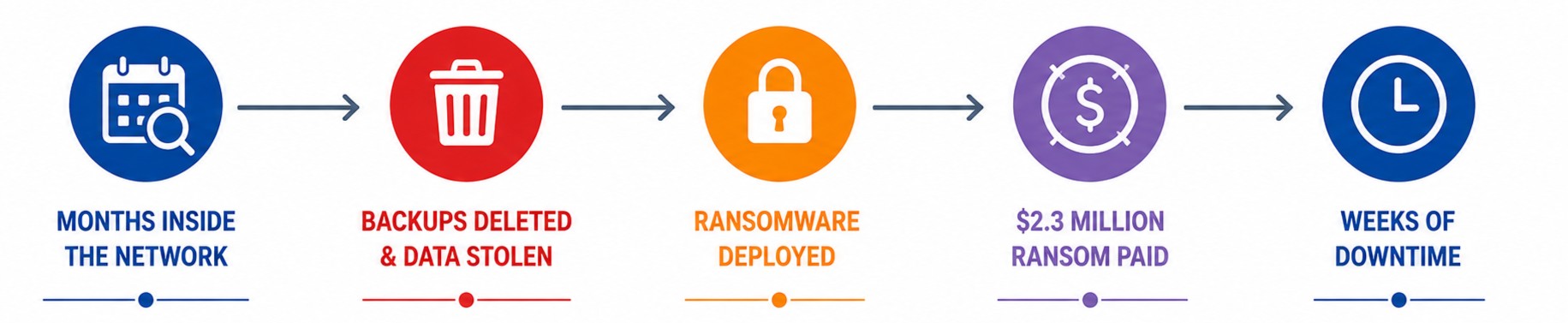
On New Year’s Eve 2019, the REvil ransomware group attacked Travelex, one of the world’s largest foreign currency exchange companies. The ransomware was not the company’s biggest problem.
The attackers had reportedly been inside the network for months. During that time, they identified Travelex’s systems, deleted backups, and exfiltrated more than five gigabytes of customer data before the attack became visible.
By the time the ransomware was launched, Travelex had no reliable recovery path. The company ultimately paid approximately US$2.3 million in ransom. The payment did not produce a quick recovery.
Services remained disrupted for weeks. Thousands of bank branches across the United Kingdom were forced to process foreign currency transactions manually. The financial and reputational damage continued long after the systems began coming back online.
Travelex’s parent company entered administration months later, and more than 1,300 jobs were lost. The ransom bought a decryption key. It could not buy back the business.
Having Backups Is Not Enough
Most organizations already have backups. The real challenge is ensuring those backups remain available when an attacker has administrative control of the production network.
A ransomware-resistant recovery strategy must assume that the attacker has already compromised privileged accounts and understands the environment.
That requires a fundamentally different approach to backup protection.
The 3-2-1-1-0 Rule for Resilient Backups
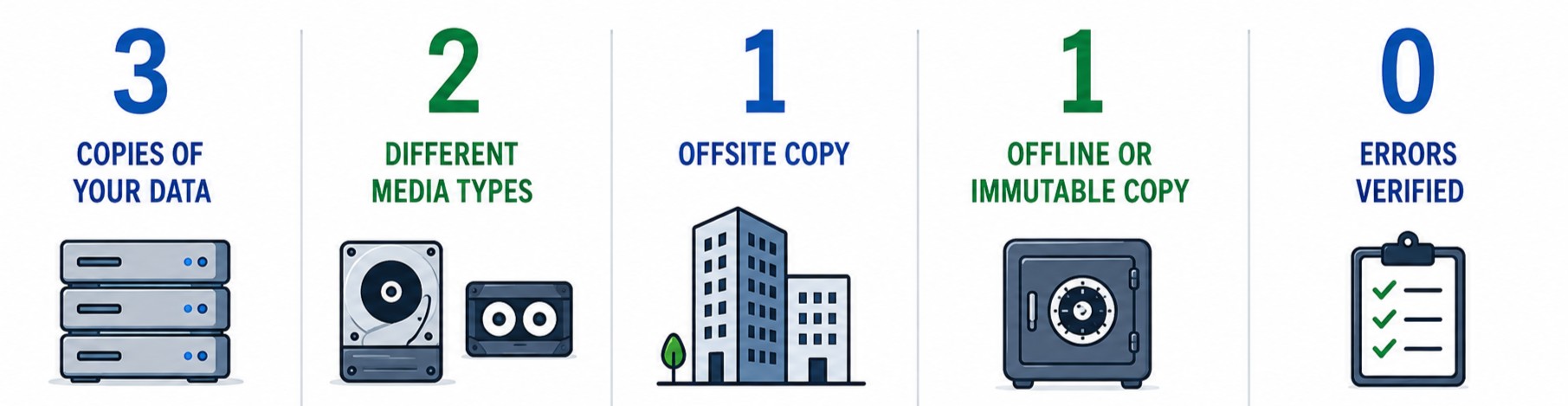
The traditional 3-2-1 backup rule calls for:
- Keep at least three copies of your data: 1 production copy and 2 backups
- Store your backups on two different types of media
- Keep at least one copy stored offsite
That model was designed primarily to protect against hardware failure, accidental deletion, and physical disasters. Modern ransomware requires two additional protections.
One Copy Must Be Offline
At least one backup copy should be completely disconnected from the production network and unreachable by an attacker who has compromised your systems. This could include tape backups stored securely offsite or removable storage that is physically disconnected after the backup is completed.
An offline copy creates a recovery option that cannot be remotely deleted, encrypted, or corrupted.
Zero Backup Jobs Should Complete with Errors
A successful backup notification does not prove that the data is complete or restorable. Backup failures, incomplete jobs, and silent corruption must be detected immediately.
The goal is not simply to run backups. The goal is to know, with confidence, that those backups can restore the systems the business depends on.
Immutable Backups: Data That Cannot Be Deleted
Immutable backup storage is one of the most important protections against ransomware. Data written to an immutable repository cannot be modified or deleted for a defined period, even by an administrator with valid credentials.
Cloud providers such as Amazon Web Services and Microsoft Azure offer this capability through technologies sometimes referred to as object lock or WORM storage, meaning Write Once, Read Many.
Immutability breaks a critical part of the ransomware playbook. Even if attackers compromise every administrator account in the organization, they cannot delete or change backup data that is locked for the duration of the retention period.
Their leverage disappears because the recovery path remains intact.
Air-Gapped & Immutable Backups: Keep Attackers Out
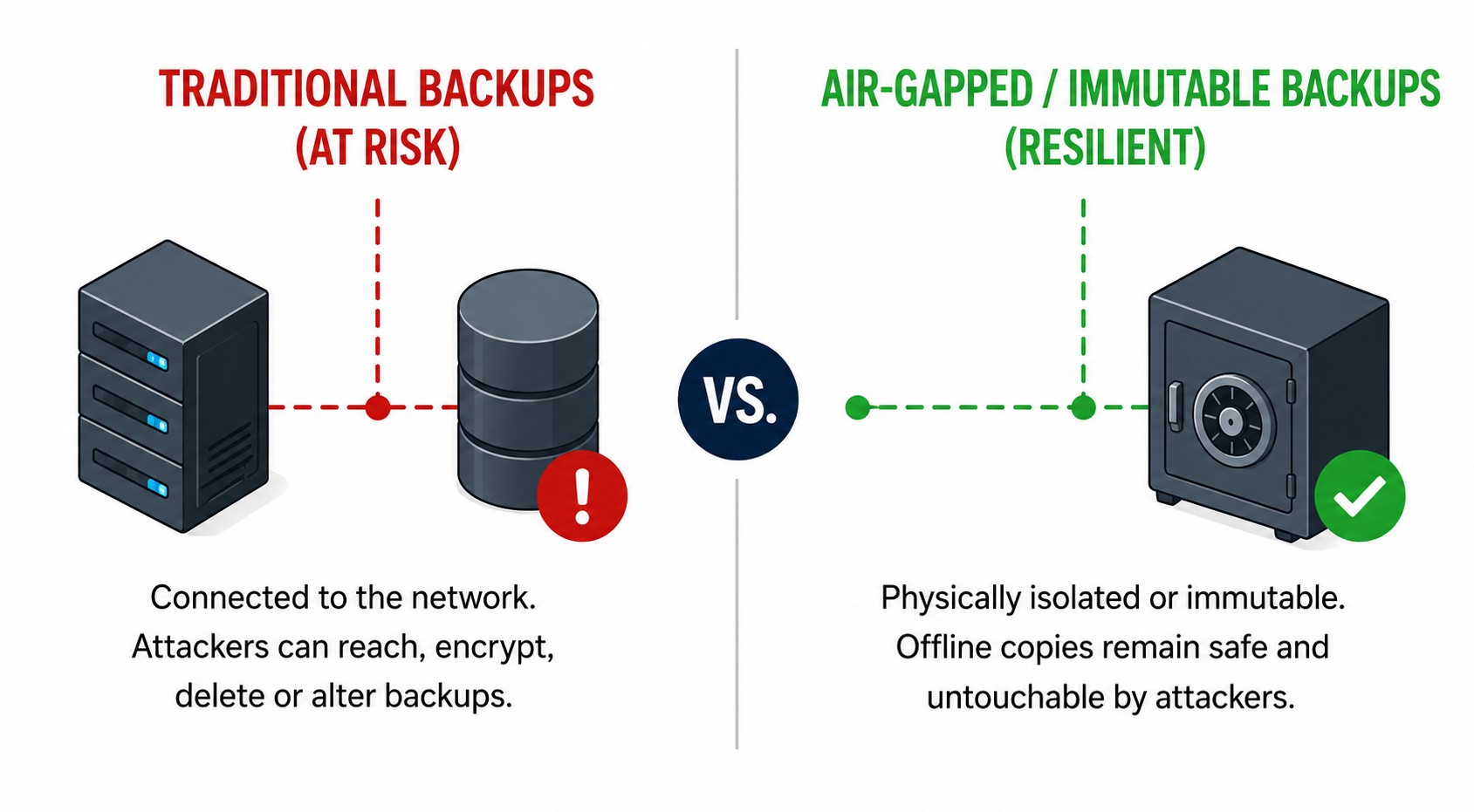
An air gap creates complete physical separation between the backup and the production network. Tape backups stored at a secure offsite facility are the traditional example.
An attacker may have full control of your network, but they cannot remotely access a tape cartridge sitting in a locked storage location.
Some organizations use removable drives or backup appliances that connect only during scheduled backup windows and are disconnected immediately afterward.
Air-gapped backups can be slower and more operationally demanding than cloud-based systems. They also provide something cloud-connected storage cannot always guarantee:
A recovery option that is genuinely unreachable through the network.
Isolated Backup Credentials
The accounts used to administer backup systems should be entirely separate from the organization’s main domain. They should not rely on the same usernames, passwords, authentication services, or privileged access pathways used by the production environment.
An attacker who compromises Active Directory should not automatically inherit access to the backup infrastructure. Separate credentials create another barrier between the attacker and the organization’s recovery plan.
Multi-factor authentication should also be enforced for cloud backup accounts and administrative access.
Segment the Backup Environment
Backup servers and storage systems should sit on a separate network segment with no automatic trust relationship to the production environment.
An attacker who takes control of the corporate network should encounter a hard boundary when attempting to reach backup infrastructure. This separation must be intentionally designed.
Simply placing backups on a different server or subnet does not necessarily provide meaningful protection if the same accounts, permissions, and administrative tools can still reach both environments.
Test Your Recovery. Prove It Works.


You can’t recover what you don’t test.
Regular restore tests turn backups into confidence.
You can’t recover what you don’t test. Regular restore tests turn backups into confidence.
A completed backup job is not the same as a successful recovery. Backup systems can report success for months while quietly producing incomplete, corrupt, or unusable data. The only reliable way to know a backup will work is to restore from it. That means more than checking whether a file can be downloaded.
Organizations should regularly restore applications, servers, databases, and critical business systems in a controlled environment and confirm that they function properly. The worst possible time to discover that a backup is corrupt is after ransomware has already destroyed the production systems.
At that point, the organization may have already refused to pay, informed customers, activated its insurance provider, and begun a recovery process that has nowhere to go.
When Backups Work: Norsk Hydro
In March 2019, Norwegian aluminum producer Norsk Hydro was struck by LockerGoga ransomware. The attack spread rapidly across the company’s global network, disrupting operations in 40 countries and forcing some plants to switch to manual processes.
Norsk Hydro refused to pay the ransom. Its leadership was able to make that decision because the company had invested in robust, isolated, and well-maintained backups.
Recovery was not easy. The total cost reached approximately US$70 million, and restoring systems across a global enterprise took considerable time and effort.
But recovery was possible. Systems were rebuilt. Operations resumed. No ransom was paid. Norsk Hydro proved that backups are more than an IT investment. They are business continuity.
The company refused to negotiate because it did not have to. Its recovery strategy survived the attack.
Backup Protection Checklist
A ransomware-resistant backup strategy should include:
- Do you follow the 3-2-1-1-0 backup rule? At least one offline or air-gapped copy that cannot be reached from the corporate network, backed by immutable cloud storage with retention locks enabled.
- Are backup accounts separate from regular accounts, and protected with MFA and least privilege? Backup administration accounts isolated from the main domain, with multi-factor authentication for cloud and backup administrator access, and separate credentials for production.
- Are backups stored offsite or in the cloud, on infrastructure separate from production? Backup infrastructure located on a separate network segment
- Do you monitor backup jobs and failures 24/7? Monitoring for failed jobs and unexpected configuration changes, with alerts for unusual deletion activity or changes to retention settings
- Do you perform regular restore tests, and can you recover critical systems within your RTO? Regular restoration tests for critical systems
- Is your backup environment documented and reviewed, with a tested incident recovery plan? Documented recovery procedures that are understood before an emergency occurs
Each control makes it more difficult for attackers to destroy every recovery path. Together, they can remove the leverage ransomware groups depend on.
By the Time You Need Your Backups, It Is Too Late to Protect Them
Ransomware groups do not gamble. They do not launch encryption and simply hope your backups fail. They investigate your environment, identify your recovery systems, and work to eliminate them before the attack becomes visible.
That is why organizations with backup software, cloud storage, and completed backup jobs can still end up paying millions of dollars or spending months rebuilding their operations.
The organizations that recover are not necessarily the ones with the greatest number of backup copies. They are the ones whose backups could not be reached.
- Offline copies
- Immutable storage
- Separate credentials
- Network isolation
- Regular recovery testing
Those decisions are made months before an attack, not during one.
Once ransomware begins encrypting production systems, the outcome has already been shaped by every recovery decision the organization made beforehand.
Protecting your backups is not simply an IT responsibility. It is what preserves your ability to continue operating when everything else goes offline.
Would Your Backups Survive a Ransomware Attack?
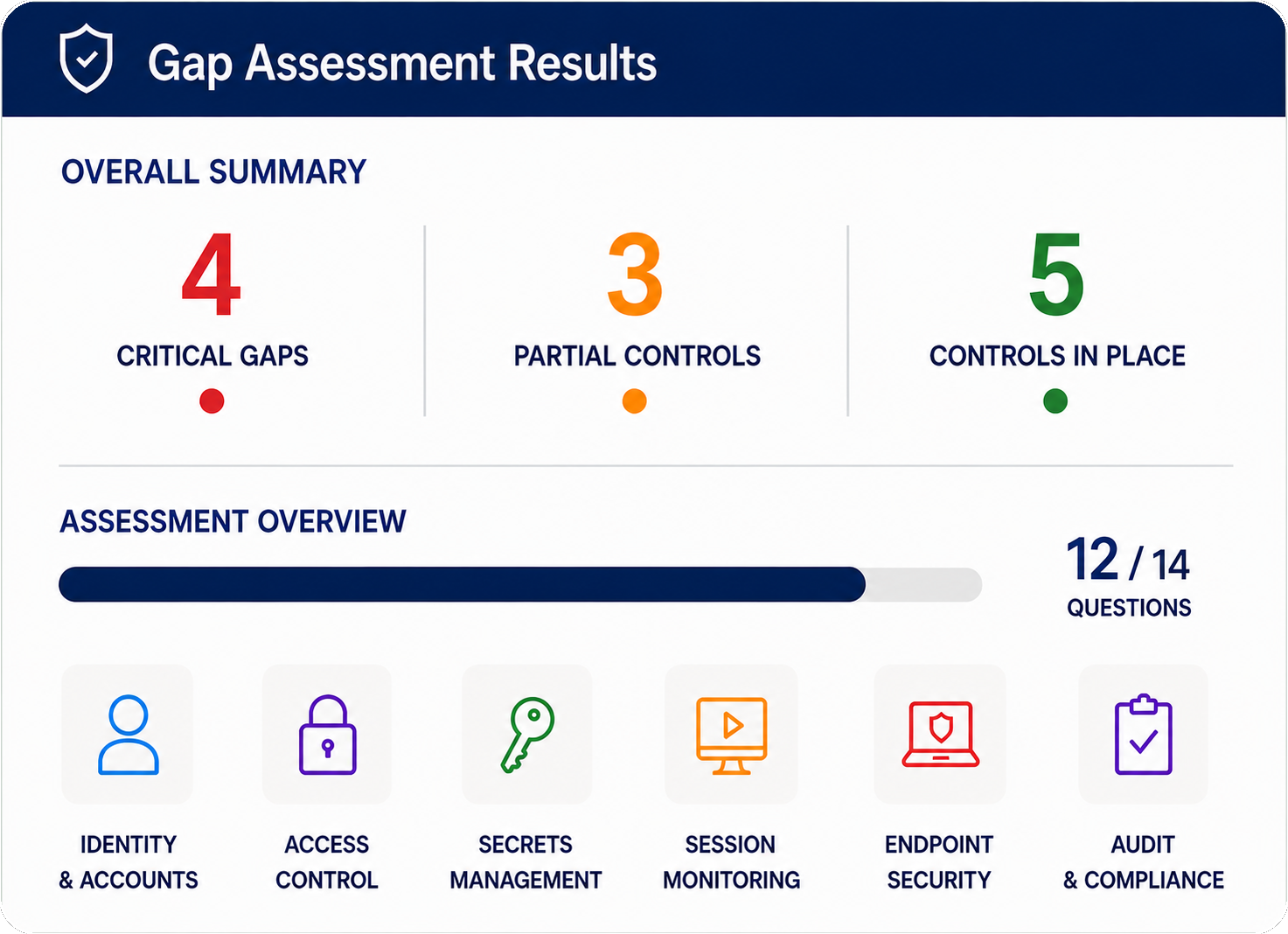
Take the free Ransomware & Data Breach Gap Assessment to uncover the identity, access, and recovery weaknesses attackers could exploit to disable your backups and eliminate your recovery options. No registration. Five minutes. Instant results.
How Exposed Is
Your Company?
Uncover hidden risks across privileged accounts, credentials, vendor access, MFA, session monitoring, and compliance controls. Take our 5 minute Gap Assessment to see where your biggest security gaps may be hiding.